Home / Blog / How to Register for E-Billing
If you are a current resident in a Co-Op, Condo, or HOA that we manage, sign up to receive your bills digitally. Here are the steps to register:

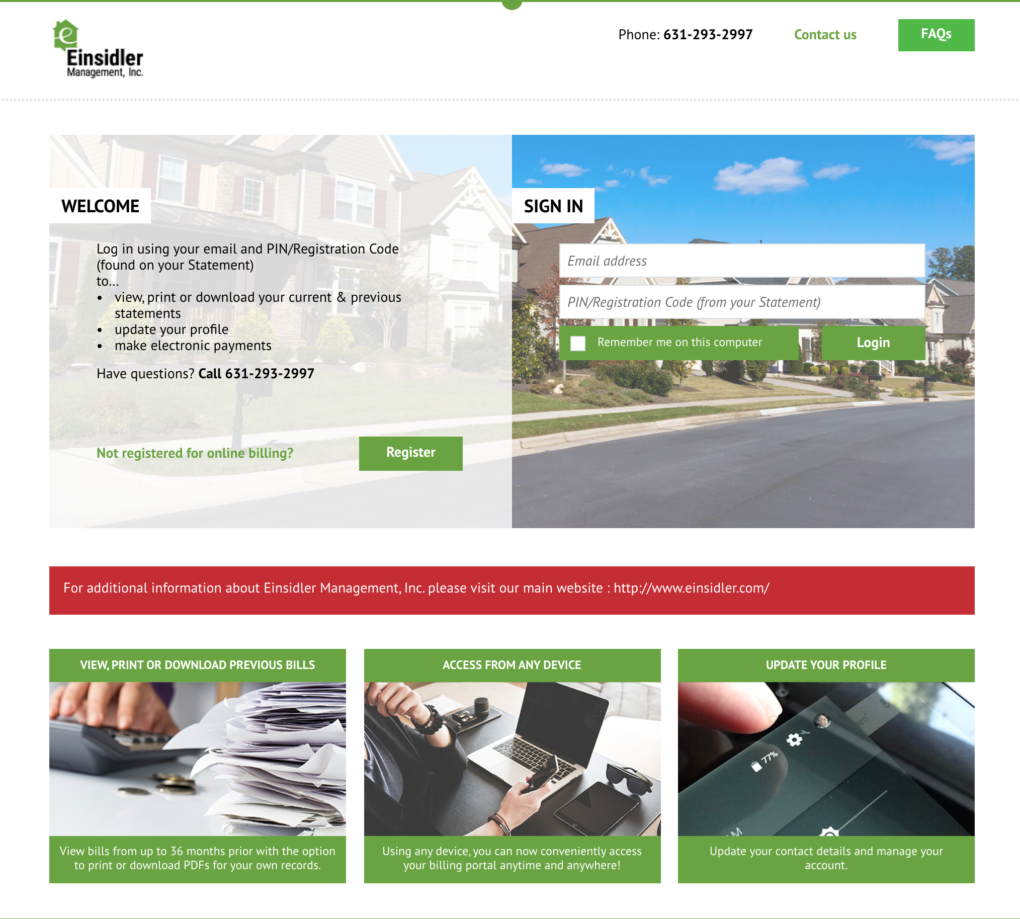
 Image of Einsidler Management, Inc.’s E-billing portal.
A Few Things to Note Prior to Registration
- You will need your account number and PIN/Registration Code from your initial paper bill before you can proceed to register.
- Registrations that are completed after the 18th of the month may take effect the following month.
- If you choose to go paperless, you will no longer receive a paper bill.
- If you are enrolled in ClickPay, we do not recommend enrolling in e-billing as ClickPay provides online billing.
How to Register for E-billing in 5 Easy Steps
- Visit einsidler.reviewmyinvoice.com. Bookmark this page in your web browser for convenient access later.
- Click on the “Register” button.
- Complete the registration form. This is where you will need your account number and PIN/Registration Code from your initial paper bill.
- Click the “Create Your Account” button.
- Receive an email to activate your account.
Do you have questions about the payment methods available to you as a homeowner or shareholder? Learn more about our payment options ➔